
Controls
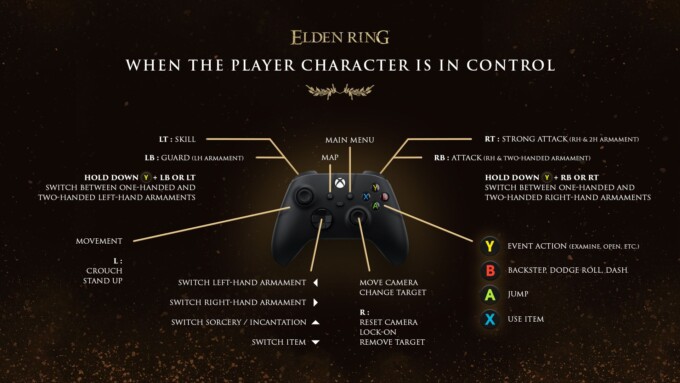
Xbox character controls
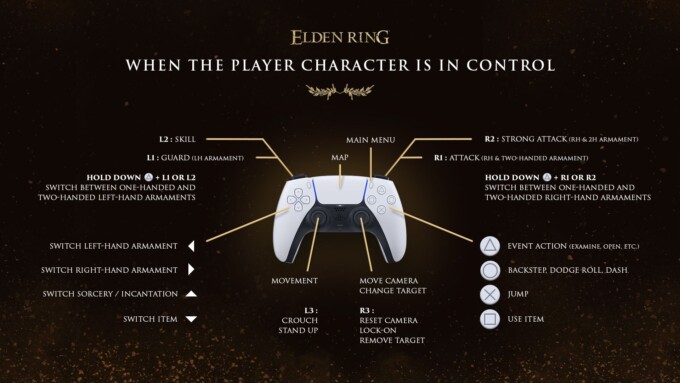
PlayStation character controls
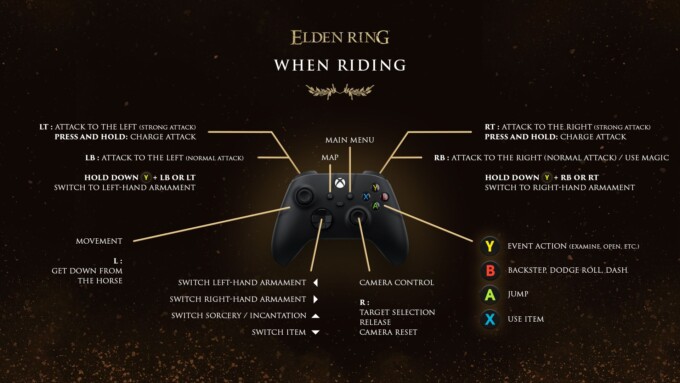
Xbox mounted controls
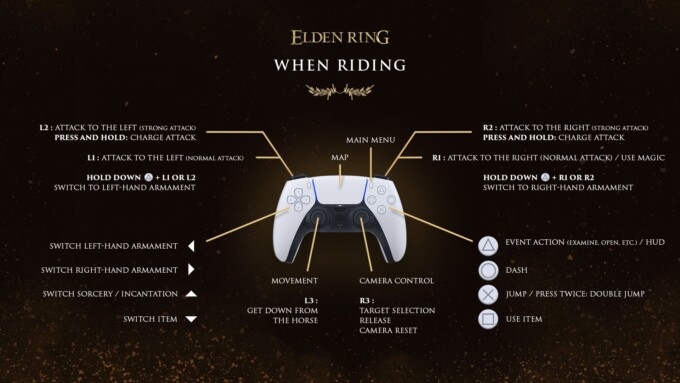
PlayStation mounted controls
Character control breakdown
| PlayStation | Xbox | Result |
| X | A | Jump |
| ⭘ | B | Backstep/Dodge Roll/Dash |
| △ | Y | Event Action |
| ☐ | X | Use Item |
| ← | ← | Switch left-hand weapon |
| → | → | Switch right-hand weapon |
| ↑ | ↑ | Change sorcery/incantation |
| ↓ | ↓ | Change item |
| Left stick | Left stick | Movement |
| Right stick | Right stick | Camera movement/Change target |
| L1 | LB | Guard (LH Weapon) |
| R1 | RB | Attack (RH & 2H weapon) |
| L2 | LT | Skill |
| R2 | RT | Strong attack (RH & 2H weapon) |
| L3 | L | Crouch/Un-crouch |
| R3 | R | Lock-on/Remove target/Reset camera |
| Options | Options | Menu |
| Touchpad | Change view | Map |
| Hold △ + L1 or L2 | Hold Y + LB or LT | Switch between one-handed and two-handed left-hand weapon |
| Hold △ + R1 or R2 | Hold Y + RB or RT | Switch between one-handed and two-handed right-hand weapon |
| Hold R1 or R2 or L2 | Hold RB or RT or LT | Special charged attack |
Mounted control breakdown
| PlayStation | Xbox | Result |
| X | A | Jump/Press twice for a double jump |
| ⭘ | B | Dash |
| △ | Y | Event action |
| ☐ | X | Use item |
| ← | ← | Switch left-hand weapon |
| → | → | Switch right-hand weapon |
| ↑ | ↑ | Change sorcery/incantation |
| ↓ | ↓ | Change item |
| Left stick | Left stick | Movement |
| Right stick | Right stick | Camera movement/Change target |
| L1 | LB | Normal attack to the left |
| R1 | RB | Normal attack to the right/Use magic |
| L2 | LT | Strong attack to the left |
| R2 | RT | Strong attack to the right |
| L3 | L | Dismount |
| R3 | R | Lock-on/Remove target/Reset camera |
| Options | Options | Menu |
| Touchpad | Change view | Map |
| Hold △ + L1 or L2 | Hold Y + LB or LT | Switch to left-hand weapon |
| Hold △ + R1 or R2 | Hold Y + RB or RT | Switch to right-hand weapon |
Special controls
Jump attack
- While jumping, press R1/RB or R2/RT to perform a jump attack
Falling attack
- When falling, press R1/RB or R2/RT to attack enemies from above
Ladder attack
- When on a ladder, press R1/RB to attack enemies above you, or R2/RT to attack enemies below you
Guard counter
- Press R2/RT immediately after guarding against an attack to perform a guard counter that can break the enemies stance
- Press L2/LT in time with the enemies attack when you have a shield with the Parry skill equipped to successfully parry
Critical hit
- Press R1/RB after parrying, when behind an enemy, or against a fallen enemy to perform a critical hit
Precision aiming
- With a bow equipped, press L1/LB to enter precision aiming mode, you can use ↑/↓ to zoom in and out
PC Controls
PC %%AUTO_LINK_PLACEHOLDER_0%% can be set in the options but in order to change the on-screen prompts so they show PC keys instead of controller buttons, see this quick guide.
Add a Commment